
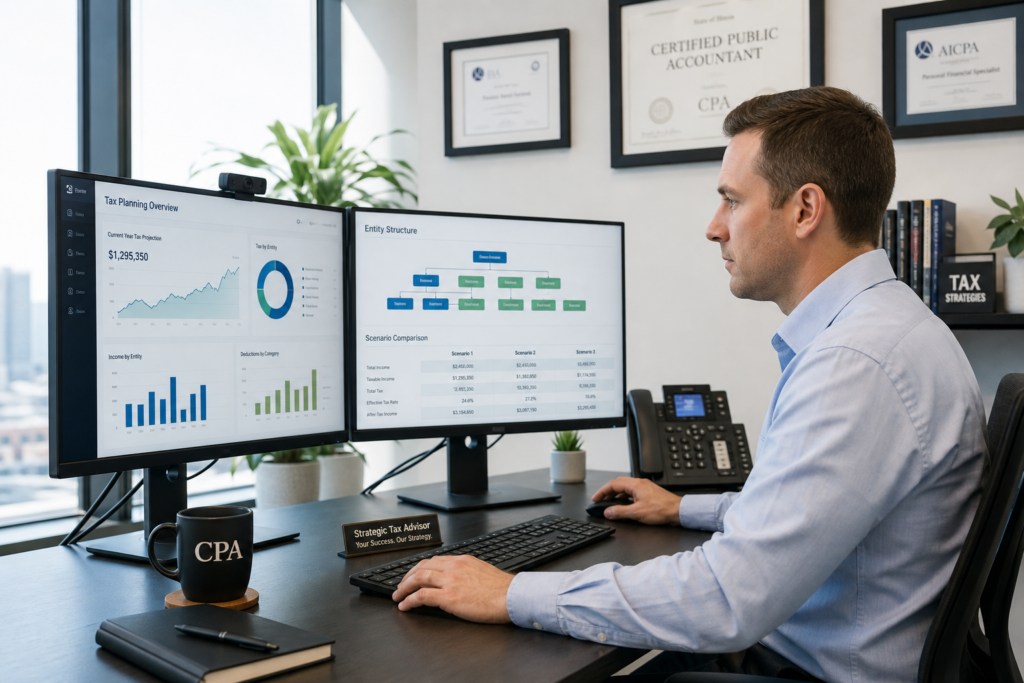
Tax Planning Software for CPAs: 2026 Ultimate Guide
Tax planning software for CPAs has evolved into a mission-critical investment for firms seeking to transition from compliance-driven services to high-value advisory engagements. For the 2026 tax year, CPAs face unprecedented opportunities to leverage technology that automates scenario modeling, integrates with existing tech stacks, and delivers professional client deliverables. The right platform can transform your practice from reactive tax preparation into proactive planning that generates advisory revenue and deeper client relationships.
Table of Contents
- Key Takeaways
- Why Does Tax Planning Software Matter for CPAs in 2026?
- What Features Distinguish Professional-Grade Tax Planning Platforms?
- How Should CPAs Evaluate Tax Planning Software ROI?
- What Integration Challenges Should CPAs Anticipate?
- Which Platforms Best Serve Specific Firm Sizes?
- How Is AI Transforming Tax Planning Software in 2026?
- What Compliance Requirements Apply to CPA Software Use?
- Uncle Kam in Action: Mid-Sized Firm Transforms Advisory Practice
- Next Steps
- Frequently Asked Questions
- Related Resources

Key Takeaways
- Tax planning software for CPAs enables the shift from compliance to advisory revenue models.
- Platform selection depends on firm size, client complexity, and integration requirements.
- AI capabilities introduced in 2026 automate scenario modeling and deliverable generation.
- IRS guidelines released June 2026 establish data security standards for AI-enabled platforms.
- Professional platforms should demonstrate 3-5x first-year ROI through advisory fee increases.
Why Does Tax Planning Software Matter for CPAs in 2026?
Quick Answer: Tax planning software for CPAs transforms firms from reactive compliance providers into proactive advisors. It automates complex scenario analysis and generates professional deliverables that justify premium fees.
The accounting profession experienced significant structural changes throughout 2025 and into 2026. According to the Thomson Reuters Institute’s 2026 State of Tax Professionals Report, nearly half of all firms saw profits rise despite ongoing talent challenges. However, revenue growth hasn’t translated proportionally to margin improvement for many firms. This disconnect reveals a critical truth: CPAs who continue offering only compliance services face commoditization pressure, while those who embrace tax advisory services command premium pricing.
The Advisory Revenue Imperative
Traditional tax preparation faces downward pricing pressure as automation and DIY software proliferate. Clients increasingly view annual compliance work as a commodity service. In contrast, proactive tax planning commands fees of $3,000 to $15,000+ per engagement. Tax planning software for CPAs bridges this gap by enabling practitioners to deliver sophisticated multi-year projections, entity structure analysis, and strategy sequencing without requiring dozens of manual spreadsheet hours.
The shift matters particularly for business owners and high-net-worth clients who face complex tax situations. These clients require scenario modeling across multiple entities, retirement vehicles, and income sources. Manual analysis becomes prohibitively time-consuming, creating a ceiling on how many high-value clients a CPA can serve effectively.
Client Expectations Have Evolved
Business clients in 2026 expect year-round strategic guidance. They’ve seen competitors leverage tax planning for significant savings and want the same proactive approach. According to the American Institute of CPAs, advisory services now represent the fastest-growing revenue segment for firms of all sizes. Clients don’t just want you to report what happened last year—they want you to show them what’s possible next year.
Furthermore, clients increasingly demand professional deliverables. Spreadsheets and verbal recommendations no longer suffice. They want branded reports with clear implementation roadmaps, quantified savings projections, and risk assessments. Quality tax planning software for CPAs automates these client-facing documents, ensuring consistency and professionalism across your entire client base.
Pro Tip: The most successful advisory-focused CPAs position tax planning as an annual subscription service rather than one-time projects. This generates predictable recurring revenue and deepens client relationships throughout the year.
Regulatory Environment Supports Technology Adoption
The IRS released preliminary AI guidelines for tax practitioners in June 2026, clarifying how existing Circular 230 requirements apply to AI-enabled software. These guidelines emphasize due diligence, secure data handling, and verification of AI outputs. Rather than creating barriers, these standards provide a framework for responsible technology adoption. The IRS guidance confirms that practitioners who implement proper safeguards can confidently leverage AI tools to enhance service delivery.
What Features Distinguish Professional-Grade Tax Planning Platforms?
Quick Answer: Professional platforms must offer multi-entity scenario modeling, integration with existing tax software, automated client deliverables, and comprehensive strategy libraries covering 100+ proven techniques.
Not all tax planning software meets the rigorous standards CPAs require for client engagements. Consumer-focused tools lack the depth and customization necessary for complex business and investment scenarios. When evaluating tax planning software for CPAs, focus on platforms specifically designed for professional practitioners serving sophisticated clients.
Entity-Aware Architecture
The most critical technical requirement is entity-aware architecture. Your clients don’t operate in simple 1040-only scenarios. They have S corporations, partnerships, rental properties, and potentially C corporations. Professional software must simultaneously model individual returns, business entity returns, and flow-through income across multiple K-1s. It should track basis, identify reasonable compensation ranges, and calculate qualified business income deductions accurately across entity structures.
This capability matters enormously when advising clients on entity structure decisions. A solo practitioner considering S Corp election needs to see side-by-side comparisons showing self-employment tax savings, payroll costs, compliance burdens, and net after-tax benefit. Entity-aware software performs these calculations instantly rather than requiring hours of manual spreadsheet work.
Comprehensive Strategy Library
Professional tax planning software for CPAs should include a library of 100+ proven strategies spanning business deductions, retirement vehicles, entity optimization, real estate techniques, and niche-specific approaches. However, the real value lies not in quantity but in intelligent sequencing. The best platforms apply a systematic framework that identifies which strategies to implement first, which to layer in subsequent years, and which to avoid based on client circumstances.
For example, the MERNA framework (Maximize deductions, Entity structure, Retirement, Niche strategies, Advanced techniques) provides a logical progression. You want software that guides you through this type of structured approach rather than dumping a random list of 200 strategies with no prioritization framework.
Professional Client Deliverables
The output quality directly impacts what fees you can command. Basic platforms generate simple PDFs with savings calculations. Professional platforms produce comprehensive branded documents that include executive summaries, detailed strategy explanations, implementation checklists, timeline recommendations, risk assessments, and supporting calculations. These deliverables should look like the work product of a premium advisory firm, not a hobbyist’s spreadsheet.
AI-powered platforms introduced in 2026 now automate much of this deliverable generation. They analyze scenario data and produce client-ready narratives explaining why specific strategies apply, what actions the client must take, and what outcomes they can expect. This automation dramatically reduces the time between analysis and client presentation.
| Feature Category | Consumer Tools | Professional CPA Platforms |
|---|---|---|
| Entity Modeling | 1040 only | Multi-entity (1040, 1120-S, 1065, Schedule C, K-1s) |
| Strategy Library | 10-20 basic strategies | 100+ with sequencing framework |
| Deliverable Quality | Basic PDF summary | Branded reports with implementation roadmaps |
| Integration | Standalone only | APIs to tax prep, CRM, accounting software |
| Data Security | Consumer-grade | IRS Circular 230 compliant, SOC 2 certified |
| Training & Support | Self-service only | Live coaching, implementation support |
Real-Time Collaboration Capabilities
Modern clients expect digital-first interactions. Professional platforms provide secure client portals where business owners can review scenarios, provide feedback, and approve recommendations. This eliminates endless email chains and allows asynchronous collaboration that respects both your time and the client’s schedule. Cloud-based access means you can work on client plans from anywhere rather than being tethered to an office workstation.
How Should CPAs Evaluate Tax Planning Software ROI?
Quick Answer: Calculate ROI by comparing annual software cost against increased advisory fees. Professional implementations typically deliver 3-5x first-year returns through higher engagement fees and increased client capacity.
Tax planning software represents a significant investment. Annual subscriptions for professional platforms typically range from $2,000 to $15,000+ depending on firm size and feature requirements. However, focusing solely on cost misses the revenue opportunity. The right question isn’t “How much does it cost?” but rather “What additional revenue will this generate?”
Fee Increase Calculations
Consider a typical scenario. A CPA currently charges $2,500 annually for tax preparation for a business client. With tax planning software for CPAs, you can offer comprehensive advisory services priced at $5,000 to $8,000 annually. That’s $2,500 to $5,500 of incremental revenue per client. If you convert just 10 existing clients to this model, you generate $25,000 to $55,000 in new advisory revenue—far exceeding any reasonable software investment.
Furthermore, advisory clients exhibit higher retention rates. When you demonstrate quantifiable tax savings year after year, clients become extremely sticky. They recognize the value you deliver extends far beyond compliance reporting. This reduces client acquisition costs and increases lifetime value dramatically.
Time Efficiency Multiplier
Manual tax planning requires 8-15 hours per comprehensive engagement when building scenarios from scratch. Professional software compresses this to 2-4 hours by automating calculations, strategy identification, and deliverable generation. This time savings creates two benefits: you can serve more clients within existing capacity, or you can reallocate saved hours to business development and relationship management activities that generate additional revenue.
Time efficiency particularly matters during tax season. Rather than being completely consumed by compliance work from February through April, you can weave in planning conversations throughout the year. This smooths revenue recognition and reduces the feast-or-famine cash flow pattern many firms experience.
Pro Tip: When presenting advisory fees to clients, frame pricing around the quantified tax savings you’ll deliver rather than the hours you’ll spend. A $6,000 planning fee seems reasonable when you show $25,000 in projected savings.
Client Acquisition Advantage
Tax planning software for CPAs also functions as a client acquisition tool. When competing for new business, the ability to offer immediate tax planning value assessments differentiates your firm. Many platforms allow you to run complimentary initial analyses showing potential savings opportunities. This demonstration of value upfront converts prospects far more effectively than generic capabilities presentations.
According to industry data, firms offering proactive planning services can charge 40-60% premium fees compared to compliance-only competitors. This pricing power accumulates year after year, compounding your ROI well beyond the initial implementation period. To explore how strategic planning drives revenue growth, visit our guide to tax strategy services.
What Integration Challenges Should CPAs Anticipate?
Quick Answer: Primary integration challenges involve data flow between tax preparation software, practice management systems, and planning platforms. Modern APIs address most technical barriers, but workflow redesign requires deliberate change management.
Most CPAs operate with established technology ecosystems including tax preparation software, document management, CRM systems, and accounting platforms. Adding tax planning software for CPAs to this stack raises legitimate integration concerns. The good news is that modern platforms increasingly offer API connections that automate data flow and reduce duplicate entry.
Tax Preparation Software Connectivity
The most critical integration point connects your planning software to tax preparation platforms. You need seamless data import from prior-year returns to establish baseline scenarios. Leading planning platforms integrate with major preparation software including CCH Axcess, Thomson Reuters UltraTax, Intuit ProConnect, Drake, and others. This integration eliminates manual data entry and ensures accuracy when building planning projections.
However, integration quality varies. Some platforms offer full bidirectional sync, while others provide only one-way import. Evaluate whether you need to push planning assumptions back into preparation software or whether import capability suffices for your workflow. Also consider update frequency—does integration happen in real-time, or does it require manual triggering?
Practice Management and CRM Coordination
Professional CPA firms track client interactions, engagement status, and deliverable completion within practice management systems. Standalone planning software creates workflow friction if your team must switch between multiple systems to track client progress. Look for platforms that either integrate with your existing practice management software or provide built-in workflow management capabilities that adequately replace separate tools.
CRM integration becomes particularly important when systematically moving clients from compliance-only relationships to advisory engagements. You need visibility into which clients have received planning proposals, which have converted, and what follow-up actions remain outstanding. Automated task creation and deadline tracking prevent clients from falling through the cracks during the transition period.
Staff Training and Change Management
Technical integration represents only half the implementation challenge. The larger barrier involves workflow redesign and staff adoption. Team members accustomed to compliance-focused work must learn new skills around consultative client conversations, scenario modeling, and advisory engagement management. This transition requires structured training and ongoing coaching, not just software tutorial videos.
The most successful implementations pair software adoption with business model transformation training. Staff need to understand not just how to use the technology, but how advisory services change client conversations, engagement letters, fee structures, and service delivery timelines. This comprehensive approach ensures technology serves as an enabler rather than creating confusion.
Which Platforms Best Serve Specific Firm Sizes?

Quick Answer: Solo practitioners benefit from unlimited-use platforms with low fixed costs. Mid-sized firms need multi-user collaboration and standardized workflows. Enterprise practices require white-label capabilities and advanced customization options.
Tax planning software for CPAs isn’t one-size-fits-all. Different practice sizes face distinct challenges and require different feature sets. Understanding these segmentation patterns helps narrow your evaluation to platforms aligned with your specific circumstances.
Solo Practitioner and Boutique Firm Considerations
Solo CPAs and small practices face unique economic constraints. Per-client usage fees become prohibitively expensive when you want to analyze many prospects before converting them to advisory clients. Unlimited-use platforms with flat subscription pricing provide far better economics. You can run assessments liberally without worrying about depleting analysis credits.
Solo practitioners also value simplicity. You don’t need complex permission structures, multi-layer approval workflows, or extensive customization capabilities. You need powerful analysis tools wrapped in an intuitive interface that doesn’t require weeks of training. Cloud-based platforms with mobile access let you work from client locations or home offices without technical infrastructure requirements.
Furthermore, solo practitioners benefit enormously from platforms that include business development training and client acquisition support. When you’re wearing all the hats in your practice, having access to proven conversation frameworks, proposal templates, and marketing assets accelerates your advisory transition dramatically.
Mid-Sized Firm Requirements
Practices with 3-20 professionals require collaboration capabilities that solo tools lack. Multiple team members need simultaneous access to client files. Partners need visibility into what associates are recommending. Quality control workflows ensure consistency across different preparers. Multi-user licensing with role-based permissions becomes essential rather than optional.
Mid-sized firms also need standardized methodologies. When five different CPAs serve similar clients, you want consistent approaches rather than each person inventing their own methods. Tax planning software for CPAs that embeds proven frameworks like MERNA ensures quality consistency regardless of who serves the client. This standardization also simplifies staff training when bringing on new team members.
Integration capabilities become more critical at this scale. Mid-sized firms have likely invested in quality practice management systems, document management, and other infrastructure. Your planning platform must play nicely with these existing investments rather than requiring wholesale technology replacement.
Enterprise and Multi-Office Practice Needs
Large practices serving hundreds or thousands of clients require enterprise-grade platforms with white-label capabilities, custom branding, and potentially API access for building custom integrations. These firms often have proprietary methodologies they’ve developed over decades. They need platforms flexible enough to accommodate unique approaches rather than forcing adoption of vendor methodologies.
Enterprise firms also need robust security and compliance features. When serving publicly traded companies or handling sensitive client data at scale, SOC 2 Type II certification and other security attestations become table stakes. Additionally, enterprise contracts typically require service level agreements guaranteeing uptime and response times.
| Firm Size | Critical Features | Pricing Preference | Primary Pain Points |
|---|---|---|---|
| Solo/Boutique (1-2 CPAs) | Unlimited use, simple interface, training included | Flat subscription ($2K-$5K/year) | Time constraints, business development skills |
| Mid-Sized (3-20 CPAs) | Multi-user collaboration, standardized workflows, integration APIs | Per-user or tiered ($5K-$15K/year) | Quality consistency, staff training, tech stack integration |
| Enterprise (20+ CPAs) | White-label, custom branding, API access, SLA guarantees | Enterprise license (negotiated) | Customization needs, security requirements, methodology fit |
How Is AI Transforming Tax Planning Software in 2026?
Quick Answer: AI capabilities introduced in 2026 automate strategy identification, scenario optimization, and client deliverable generation. However, IRS guidelines require human review of all AI outputs before client delivery.
Artificial intelligence fundamentally changed tax planning software for CPAs throughout 2025 and into 2026. However, the transformation differs from consumer AI hype. Professional AI applications focus on automating time-consuming analytical tasks while maintaining the CPA’s role as strategic advisor and final reviewer.
Automated Strategy Identification
Modern AI engines analyze client tax returns and financial data to automatically identify applicable strategies from comprehensive libraries. Rather than manually reviewing 300+ potential techniques, the system highlights the 15-20 strategies most relevant to specific client circumstances. This pattern matching dramatically accelerates the initial planning phase.
However, AI recommendations require professional judgment. The IRS guidelines released in June 2026 explicitly require CPAs to verify AI outputs for accuracy and appropriateness before presenting recommendations to clients. AI serves as a highly efficient first draft, not a replacement for professional expertise. You remain responsible for ensuring recommendations align with client goals and comply with current regulations.
Natural Language Client Deliverables
Perhaps the most impactful AI application involves generating written client deliverables. After you build and approve scenarios, AI systems create comprehensive reports explaining strategies in plain language clients understand. These narratives describe how each technique works, why it applies to their situation, what actions they must take, and what outcomes they can expect.
This deliverable automation saves 4-6 hours per engagement that CPAs previously spent writing client-facing documents. The AI maintains consistent quality and professional tone across all client communications. You can still customize and edit the output, but starting from an AI-generated draft accelerates completion dramatically. Learn more about leveraging technology in your tax preparation workflow.
Compliance and Security Considerations
The IRS guidelines establish clear standards for AI use in tax practice. You must use only secure, enterprise-approved AI platforms with robust confidentiality safeguards. Consumer AI tools like ChatGPT that don’t guarantee data privacy violate Circular 230 requirements when used with client information. Professional tax planning software for CPAs includes appropriate security controls and data handling protocols that comply with IRS standards.
Additionally, the guidelines require documentation of AI usage and verification processes. You should maintain records showing you reviewed AI recommendations before presenting them to clients. This documentation demonstrates due diligence if questions arise later. The standards don’t prohibit AI use—they simply require responsible implementation with appropriate professional oversight.
Pro Tip: When explaining AI-assisted planning to clients, emphasize that technology handles calculations and documentation while your professional judgment guides strategy selection and implementation sequencing. This positions AI as an efficiency tool rather than a replacement for your expertise.
What Compliance Requirements Apply to CPA Software Use?
Quick Answer: CPAs must ensure planning software protects client data per IRC sections 6713 and 7216(a). Platforms should maintain SOC 2 compliance and follow secure data handling protocols outlined in Circular 230.
Tax planning software for CPAs handles sensitive financial data subject to strict confidentiality requirements. The IRS enforces these standards through Circular 230, which governs practice before the IRS, and through specific code sections addressing taxpayer information disclosure. Understanding these requirements ensures you select compliant platforms and avoid potential disciplinary actions.
Data Security Standards
IRC section 7216(a) prohibits unauthorized disclosure or use of taxpayer information. This applies not just to how you handle data personally, but also to the software vendors you engage. When evaluating platforms, verify they implement enterprise-grade encryption for data at rest and in transit. Cloud platforms should maintain SOC 2 Type II certification demonstrating comprehensive security controls.
Additionally, examine vendor data handling policies. Where are servers located? Who has access to client data? How long is data retained? Can the vendor use client information for other purposes like training AI models? Reputable professional platforms contractually commit to strict confidentiality and provide clear answers to these questions. Consumer-grade tools often lack these protections.
Professional Responsibility Standards
Circular 230 Section 10.36 requires CPAs to exercise due diligence in preparing documents and determining the correctness of representations to clients. When using tax planning software for CPAs, this means you cannot blindly accept software outputs. You must understand the calculations, verify assumptions, and ensure recommendations appropriately apply to client circumstances.
The June 2026 IRS AI guidelines reinforce these requirements. They emphasize that technology assists but doesn’t replace professional judgment. You remain responsible for the accuracy of client advice regardless of whether a human or AI system performed initial analysis. Document your review process to demonstrate compliance if questions arise later. To understand broader compliance considerations, explore our business solutions for professional service firms.
State-Specific Considerations
Beyond federal requirements, state CPA boards may impose additional technology standards. Some states require specific data retention periods or impose particular security measures. If you practice across multiple states, ensure your software platform complies with the most stringent requirements among your license jurisdictions. Multi-state firms should specifically inquire about state-specific compliance features during vendor evaluations.
Uncle Kam in Action: Mid-Sized Firm Transforms Advisory Practice
Thompson & Associates, a seven-CPA firm in Ohio, faced the classic mid-sized practice dilemma in early 2025. Despite solid compliance revenue, margins stagnated as clients increasingly viewed tax preparation as a commodity. Senior partner Jennifer Thompson recognized the firm needed to shift toward advisory services but lacked the tools and methodology to make the transition successfully.
The firm’s annual revenue was approximately $1.8 million, primarily from compliance work priced at $1,500 to $3,500 per business client. They had attempted manual tax planning previously but found the time requirements prohibitive. Building comprehensive scenarios required 10-15 hours per client, making it economically unfeasible except for their largest accounts.
The Challenge: Thompson needed tax planning software for CPAs that would enable the entire team to deliver consistent advisory services without requiring each CPA to become a planning expert independently. The firm also needed training on how to transition client conversations from compliance-focused to advisory-oriented. Additionally, they required a pricing framework that clients would accept for these new services.
The Solution: In March 2025, Thompson implemented an advisory operating system combining planning software with structured training on the business of advisory services. The platform provided unlimited client assessments, eliminating per-use costs that previously limited who they could analyze. The MERNA framework gave the team a consistent methodology for identifying and sequencing strategies across different client situations.
The firm began by offering complimentary tax planning assessments to their top 50 business clients during spring 2025. These assessments identified potential savings opportunities and served as conversation starters about advisory engagements. The AI-powered platform automated deliverable generation, reducing analysis time from 10-15 hours to just 2-3 hours per comprehensive plan.
The Results: By December 2025, Thompson had converted 34 clients to ongoing advisory engagements priced at $5,000 to $9,000 annually. This generated $224,000 in new advisory revenue during the first nine months. The firm invested $12,500 in software and training, producing an 18x first-year return. More importantly, client retention reached 98% among advisory clients compared to 84% among compliance-only clients.
Jennifer Thompson noted, “The difference is that we now prove our value quarterly rather than just at tax time. Clients see exactly what we’re delivering throughout the year. That changes the entire relationship dynamic.” The firm now aims to convert 75% of business clients to advisory engagements by the end of 2026. To explore similar transformations, visit our client success stories.
The Thompson story illustrates the compounding benefits of tax planning software for CPAs. Initial ROI comes from advisory fee increases, but sustained benefits include higher retention, improved client satisfaction, and practice differentiation that supports premium pricing long-term.
Next Steps
Transitioning to advisory services requires more than just purchasing software. Success depends on strategic implementation, team training, and systematic client transition. Consider these action items as you evaluate tax planning software for CPAs:
- Audit your current client base to identify 20-30 ideal candidates for advisory services based on business complexity and relationship strength.
- Request demonstrations from 3-5 platforms aligned with your firm size and client profile to compare functionality and user experience.
- Calculate your target ROI by modeling advisory fee increases across different client conversion scenarios to establish financial expectations.
- Develop a pilot implementation plan testing advisory services with 5-10 clients before firm-wide rollout to refine your approach.
- Explore comprehensive tax planning software that includes both technology and business development training to accelerate your transition.
The firms that successfully transition to advisory models don’t treat software as a magic bullet. They recognize that technology enables a strategic business model shift that requires deliberate planning, team alignment, and client education. If you’re ready to explore how tax planning software for CPAs can transform your practice, book a strategy session to discuss your specific situation and develop a customized implementation roadmap.
The advisory opportunity won’t remain open indefinitely. As more CPAs adopt planning capabilities, client expectations will shift. Firms that move early establish market position and pricing power before advisory services become table stakes rather than differentiators.
Frequently Asked Questions
What is the best tax planning software for small CPA firms?
Small firms benefit most from unlimited-use platforms with flat subscription pricing rather than per-client fees. Look for solutions that include business development training and client conversation frameworks, not just technical software. The ideal platform for practices with 1-5 CPAs combines powerful analysis capabilities with simple interfaces that don’t require extensive training. Cloud-based access and mobile functionality let you work from anywhere. Platforms specifically designed for professional advisors serving business clients will outperform consumer-focused tools significantly.
How secure are cloud-based tax planning platforms?
Professional platforms maintain enterprise-grade security including SOC 2 Type II certification, data encryption at rest and in transit, and strict access controls. These security standards typically exceed what individual firms can implement with on-premise servers. However, security quality varies dramatically across vendors. Verify that platforms comply with IRS Circular 230 requirements and IRC sections 6713 and 7216(a) governing taxpayer information protection. Reputable vendors provide detailed security documentation and undergo regular third-party audits. Avoid consumer-grade tools that don’t contractually guarantee data confidentiality and appropriate use limitations.
Can I use tax planning software if I’m not a CPA?
Enrolled Agents and other tax professionals authorized to practice before the IRS can use professional tax planning software for CPAs. The platforms themselves don’t restrict access based on credentials. However, providing tax planning advice requires appropriate professional qualifications. If you’re an EA, tax attorney, or other licensed professional, these tools enhance your service delivery. If you lack professional credentials, using planning software to advise others on tax matters may constitute unauthorized practice. Additionally, professional platforms often verify credentials during signup to ensure users meet appropriate standards.
How long does implementation typically take?
Technical setup for cloud platforms takes 1-2 days including account configuration and data integration. However, effective implementation requires 30-60 days for team training, workflow development, and pilot testing. The firms that struggle with adoption treat software as plug-and-play technology. Successful implementations recognize the need for process redesign, staff education, and gradual rollout. Plan for a 90-day ramp-up period before achieving full productivity. During this period, focus on converting 5-10 pilot clients while refining your approach before firm-wide deployment.
What happens if tax laws change after I create plans?
Professional tax planning software for CPAs includes automatic updates reflecting current tax law. When regulations change, the platform recalculates scenarios using updated rules. However, you remain responsible for reviewing revised recommendations and notifying clients of material changes affecting their plans. Quality platforms send alerts when legislative changes impact existing client scenarios. This automated monitoring prevents plans from becoming outdated silently. Include plan review and update services in your advisory engagement letters to ensure clients understand planning is an ongoing process, not a one-time deliverable.
Do I need separate software for different client types?
Comprehensive platforms handle multiple client profiles including business owners, real estate investors, high-net-worth individuals, and self-employed professionals within a single system. However, some specialized tools focus exclusively on niche planning areas like cost segregation or retirement planning. For most CPAs, an all-in-one platform serving diverse client types proves more efficient than managing multiple specialized tools. Evaluate whether platforms include the specific strategies relevant to your client base, such as real estate techniques, entity structuring, or advanced wealth planning approaches.
How do I justify advisory fees to price-sensitive clients?
Frame advisory pricing around quantified tax savings rather than hours worked. A $6,000 annual advisory fee seems reasonable when you demonstrate $25,000 to $40,000 in projected savings. Use tax planning software for CPAs to generate complimentary initial assessments showing specific opportunities. These assessments prove value before clients commit to paid engagements. Additionally, position advisory services as annual subscriptions providing ongoing optimization rather than one-time projects. This framing helps clients understand they’re receiving year-round strategic guidance, not just an expensive report.
Can tax planning software integrate with my existing practice management system?
Modern platforms increasingly offer API integrations with popular practice management systems, CRM platforms, and tax preparation software. Integration quality varies from full bidirectional sync to simple data import capabilities. During vendor evaluation, specifically ask about integration with your existing technology stack. Request demonstrations showing actual data flow rather than relying on marketing claims. Some platforms provide built-in practice management capabilities that may adequately replace separate systems for smaller firms. Enterprise practices typically require custom integration work to connect planning software with proprietary systems.
What ongoing costs should I expect beyond initial subscription fees?
Budget for annual subscription fees plus potential integration costs if connecting to existing systems. Some platforms charge separately for premium features, additional users, or advanced training programs. Factor in staff training time as an indirect cost during initial implementation. However, avoid platforms with hidden per-client analysis fees that can dramatically increase costs as you scale advisory services. The best economic model for most CPAs involves flat annual subscriptions with unlimited client usage. This pricing structure aligns costs with firm growth rather than penalizing success with escalating per-use charges.
Related Resources
- Comprehensive Tax Planning Software for CPAs
- The MERNA Method: Strategic Tax Planning Framework
- Tax Strategy Blog: Latest Planning Insights
- Tax Planning Guides and Resources
This information is current as of 6/30/2026. Tax laws change frequently. Verify updates with the IRS or relevant regulatory bodies if reading this later.
Last updated: June, 2026

