
Tax Planning Software for CPAs: 2026 Buyer’s Guide
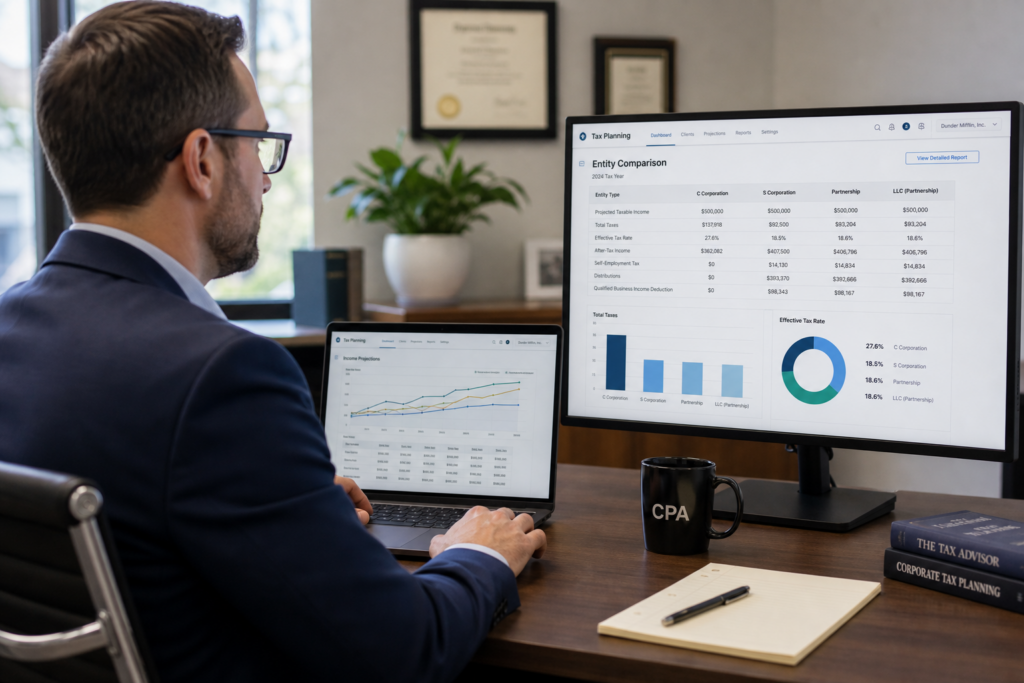
Choosing the right tax planning software for CPAs can decide whether your firm stays stuck in compliance work or grows into a high-margin advisory practice. In 2026, the right tax planning software for CPAs automates research, models entity scenarios, and produces client-ready deliverables that justify premium fees. This guide breaks down what to look for, how top tools compare, and how firms are using technology to scale recurring revenue.
Table of Contents
- Key Takeaways
- What Is Tax Planning Software and Why Does It Matter in 2026?
- What Features Should CPAs Look for in Tax Planning Software?
- How Does Tax Planning Software Compare Across Providers?
- How Do You Choose the Right Tax Planning Software for Your Firm?
- How Can Tax Planning Software Help You Build Recurring Advisory Revenue?
- What Compliance Risks Come With AI-Powered Tax Planning Software?
- Uncle Kam in Action: A Solo CPA Scales to Advisory
- Related Resources
- Next Steps
- Frequently Asked Questions

Key Takeaways
- Tax planning software for CPAs automates research, scenario modeling, and client deliverables.
- The IRS issued 2026 guidance requiring human review of all AI-generated tax outputs.
- Workflow automation cuts plan-build time and supports recurring advisory billing models.
- Unlimited free assessments let firms prove value before clients sign an engagement.
- Firm size and specialty should drive your software evaluation, not just price.
What Is Tax Planning Software and Why Does It Matter in 2026?
Quick Answer: Tax planning software for CPAs models tax-saving strategies across a client’s full financial picture. It turns hours of manual research into minutes of automated analysis.
Tax planning software differs from traditional tax prep software in one key way. Prep software files what already happened. Planning software forecasts what could happen, then helps you act on it before year-end. For CPAs, this distinction matters more than ever in 2026, as clients increasingly expect proactive guidance, not just a finished Form 1040.
According to the Thomson Reuters Institute’s 2026 State of Tax Professionals Report, two-thirds of firms expect revenue to increase over the next year. However, many firms are growing revenue without growing margin, largely because manual processes still eat up staff time. Tax planning software directly addresses this gap by automating the heaviest lifting: scenario modeling, strategy identification, and deliverable creation.
Why Manual Tax Planning No Longer Scales
Manual tax planning relies on spreadsheets, memory, and individual expertise. As a result, plans take longer to build, quality varies between staff, and few firms can scale advisory services beyond a handful of VIP clients. Furthermore, manual processes make it nearly impossible to model multiple entity structures side by side in real time.
The Shift From Compliance to Continuous Advisory
In June 2026, the tax-filing platform Taxfyle launched a planning tool that bundles AI-assisted scenario modeling with full-service filing, explicitly positioning tax as a continuous advisory service rather than a once-a-year compliance task. This trend reflects where the entire profession is heading. Firms that adopt similar tools early can capture advisory revenue before competitors catch up.
Pro Tip: Run a free assessment for every prospect, not just signed clients. This shows tangible value before they ever pay a retainer.
What Features Should CPAs Look for in Tax Planning Software?
Quick Answer: Look for entity-aware modeling, automated strategy libraries, client-ready reports, and integration with your existing practice management stack.
Not every feature matters equally. Some functions, like a strategy library, directly affect how many savings opportunities you can surface for a client. Other features, like CRM integration, affect how efficiently your team operates day to day. Therefore, you should weigh features against your firm’s specific bottlenecks.
Workflow Automation and Strategy Libraries
A robust strategy library catalogs deductions, credits, and entity options so your team is not starting research from scratch for every client. Workflow automation then sequences those strategies logically, often referred to as a framework, so nothing gets missed. This combination is what separates a basic calculator from true tax planning software for CPAs.
- Automated strategy matching based on client entity type and income
- Pre-built templates for common scenarios like S Corp elections
- Sequencing logic that prioritizes the highest-impact strategies first
- Audit trails documenting how each recommendation was generated
Client-Facing Deliverables That Justify Higher Fees
Clients pay for clarity, not raw numbers. A polished, branded report with a strategic summary and implementation roadmap helps clients understand exactly what they are paying for. This is one reason firms using professional tax planning software can justify advisory fees well above standard prep pricing.
Integration With Your Practice Management Stack
Software that connects to your CRM, document management, and accounting platforms removes duplicate data entry. As a result, your staff spends less time on administrative tasks and more time on client strategy conversations. When evaluating vendors, ask specifically how their API connects to the tools you already use.
How Does Tax Planning Software Compare Across Providers?
Quick Answer: Providers vary by assessment limits, pricing models, and whether they bundle training or lead generation alongside the software itself.
Several well-known platforms serve the tax planning software market, including Corvee (now Instead), TaxPlanIQ, Holistiplan, Tax Planner Pro, and modules within Thomson Reuters and Bloomberg Tax products. Each offers strategy identification and reporting, though pricing structures and assessment limits differ by vendor and tier. Below is a general feature comparison framework CPAs can use during evaluation.
| Evaluation Factor | Why It Matters |
|---|---|
| Assessment limits | Capped or paid assessments limit how many prospects you can analyze before they sign |
| Entity-aware modeling | Multi-entity clients need software that models 1040s, 1120-Ss, and K-1s together |
| Client deliverable quality | Branded, structured reports support higher advisory fees |
| Included training | Some vendors only sell software; others bundle coaching on pricing and sales |
| Lead generation | A built-in marketplace can fill your pipeline without separate marketing spend |
When you compare options, look beyond the feature checklist. Ask each vendor directly about assessment caps, since many tools charge per analysis or limit usage by tier. This single factor can make a meaningful difference in how aggressively you can prospect.
Pro Tip: Ask vendors for a live demo using one of your actual client files. Generic demos hide usability problems.
How Do You Choose the Right Tax Planning Software for Your Firm?
Quick Answer: Match software to your firm size, client base, and revenue goals, then test it on real client scenarios before committing.
A solo CPA serving freelancers has very different needs than a 20-person firm serving real estate investors and multi-entity business owners. Consequently, the right tax planning software for CPAs depends heavily on firm size and client mix. Below is a quick segmentation to guide your search.
Solo Practitioners and Small Firms
Solo CPAs typically need fast, templated strategy identification without a steep learning curve. Unlimited or generous free assessments matter most here, since solo practitioners often pitch advisory services to prospects who have not yet committed to paying. A tax planning software with unlimited assessments lets you prove value on every consultation call without worrying about running out of credits.
Mid-Sized Firms
Mid-sized firms generally need stronger workflow automation across multiple preparers, plus role-based permissions and reporting consistency. Integration with existing practice management software becomes more important at this stage, since manual handoffs between staff create bottlenecks.
Enterprise and Multi-Office Practices
Larger practices often require enterprise-grade security, audit logging, and centralized strategy governance across offices. If your firm operates in multiple states, confirm the software updates state-specific rules alongside federal changes for the 2026 tax year.
Whatever your firm size, our AI-driven tax planning software for CPAs supports solo practitioners through enterprise teams with scalable assessment limits and entity-aware scenario modeling for 2026 planning. You can also review the tax strategy services page for examples of strategies the platform helps surface for clients across income levels.
How Can Tax Planning Software Help You Build Recurring Advisory Revenue?

Quick Answer: Software that produces ongoing, quarterly, or annual planning deliverables naturally supports subscription-style advisory billing instead of one-time fees.
Recurring revenue starts with a recurring deliverable. If your tax planning software only produces a one-time PDF, clients have little reason to keep paying after year one. However, if the software supports quarterly check-ins, updated projections, and year-over-year tracking, you have a natural structure for monthly or annual advisory retainers.
From One-Time Plans to Ongoing Engagements
Consider a firm that previously charged a flat $1,500 for a single annual tax plan. By switching to software with quarterly scenario updates, the same firm can reasonably charge $500 per month, or $6,000 annually, for ongoing monitoring. That is a 4x increase in revenue per client without adding new clients.
Why Entity Structuring Belongs in Every Plan
Many of the highest-value strategies, like S Corp elections or holding company structures, require ongoing monitoring rather than a single decision. Reviewing entity structuring options annually as a client’s income grows is a natural fit for software-supported, recurring advisory work. Likewise, real estate investors often need updated depreciation and cost segregation modeling every time they acquire a new property, which fits this same recurring engagement model. If you regularly work with real estate investor clients, software with portfolio-level modeling is especially valuable.
Did You Know? Firms offering quarterly planning retainers often retain clients longer than firms that only sell annual prep.
Selling the value of advisory is only half the equation. You also need a system that supports the full lifecycle from prospecting to delivery. This is why a true tax advisory operating system combines software, training on pricing and sales, and built-in opportunities, rather than just a calculator that sits idle between tax seasons.
What Compliance Risks Come With AI-Powered Tax Planning Software?
Quick Answer: The IRS requires practitioners to independently verify all AI-generated tax outputs under existing Circular 230 competence and diligence rules.
In June 2026, the IRS Office of Professional Responsibility issued preliminary guidance clarifying how Circular 230 applies to generative AI use in tax practice. This guidance does not create new rules. Instead, it confirms that existing obligations of competence, diligence, and confidentiality apply fully when AI tools assist with tax planning.
Why Human Review Still Matters
According to the IRS guidance, practitioners cannot rely solely on AI-generated content. You must verify facts, citations, and calculations before delivering any plan to a client. This means tax planning software for CPAs should support your judgment, not replace it. Always treat AI-drafted language as a starting point, then apply your own technical review before client delivery.
Fee Transparency and Billing Practices
The same 2026 guidance also addresses billing. Under Section 10.27(a) of Circular 230, practitioners may not charge unconscionable fees. As a result, the IRS expects firms to pass along reasonable cost savings from AI efficiency rather than billing clients for time that was not actually spent. Review the official Office of Professional Responsibility and Circular 230 guidance directly on IRS.gov before updating your billing structure.
Data Security Expectations
The IRS guidance also flags privacy risks when client data is processed by third-party AI tools. Before adopting any new tax planning software for CPAs, confirm the vendor’s data handling policies, encryption standards, and whether client data is ever used to train external models. The American Institute of CPAs offers additional guidance on evaluating technology vendors for client data protection.
- Document your AI usage and verification process for each client file
- Never upload sensitive client data to unsecured or unvetted platforms
- Train staff on the limitations of AI-generated tax research
- Disclose AI use to clients in general or specific terms as appropriate
Uncle Kam in Action: A Solo CPA Scales to Advisory
Client Snapshot: A solo CPA in Texas ran a traditional 1040 prep practice serving about 180 individual clients each season. Financial Profile: The firm generated roughly $210,000 in annual revenue, almost entirely from seasonal compliance work, with thin margins after staff and software costs.
The Challenge: The CPA wanted to offer tax planning but lacked time to build custom strategy decks for each prospect. Manual research made it impossible to run more than two or three planning consultations per week, which capped advisory growth.
The Uncle Kam Solution: The firm adopted Uncle Kam’s tax planning software for CPAs, using the MERNA framework to run unlimited free assessments on every prospect. The CPA used entity-aware modeling to compare S Corp election scenarios for 14 business-owner clients in the first quarter alone, then delivered branded, client-ready reports for each one.
The Results: Within two tax seasons, the firm converted 22 prep-only clients into quarterly advisory retainers. Tax Savings: Clients collectively saved an estimated $187,000 in 2026 through entity restructuring and retirement strategy adjustments. Investment: The firm’s annual software and coaching investment totaled $4,800. Return on Investment (ROI): New advisory revenue reached $96,000 in the first year, representing a 20x return on the firm’s software investment. You can review more outcomes like this on the client results page.
Related Resources
- Tax advisory services for growing firms
- The MERNA strategy sequencing method
- Tax strategy blog for CPAs and advisors
- Tax calculators for client planning
- Business solutions for accounting firms
Next Steps
Ready to move beyond seasonal prep work and build a real advisory practice? Tax planning software for CPAs is the foundation, but execution and positioning matter just as much. Review your current filing and compliance workflow to find where automation can free up staff time first.
- Audit your current tech stack for integration gaps and assessment limits
- Run a free assessment on three current clients to identify missed savings
- Draft a quarterly advisory retainer offer for your top 10 clients
- Book a strategy session to map out your firm’s 2026 advisory growth plan
- Document your AI review process to stay aligned with 2026 IRS guidance
This information is current as of 6/30/2026. Tax laws change frequently. Verify updates with the IRS or your state board if reading this later. If you want hands-on help choosing and implementing the right system, book a strategy session with Uncle Kam to walk through your firm’s specific advisory roadmap.
Frequently Asked Questions
Is tax planning software different from tax prep software?
Yes. Prep software files completed returns, while planning software models future strategies before decisions are made. Most firms need both, but planning software drives advisory revenue growth.
How much does tax planning software for CPAs typically cost?
Pricing varies widely by vendor, ranging from monthly subscriptions to per-assessment fees. Always confirm whether assessments are capped, since unlimited usage changes the math for firms running many prospect consultations.
Can solo CPAs use enterprise-grade tax planning software?
Many platforms offer tiered plans designed for solo practitioners. Look specifically for unlimited or generous free assessments, since solo CPAs often need to demonstrate value before clients commit.
How long does it take to implement new tax planning software?
Most firms can onboard within two to four weeks, including staff training and integration with existing systems. Running a pilot with a small group of clients first helps surface workflow issues early.
Does using AI in tax planning software create compliance risk?
AI itself does not create risk, but unverified AI output does. Under 2026 IRS guidance, practitioners must independently review all AI-assisted recommendations before delivering them to clients.
What is the fastest way to start generating advisory revenue?
Start by running free assessments on your existing prep clients to surface missed savings. Then, present findings in a structured report and offer a quarterly advisory retainer to implement the strategies.
Last updated: June, 2026

