
Tax Planning Software for CPAs: 2026 Buyer Guide
Choosing the right tax planning software for CPAs is now a growth decision, not just a tech purchase. In 2026, the firms winning high-ticket advisory work use software that models strategies, not just files returns. The IRS itself runs 126 active AI projects, so clients need proactive guidance more than ever. This guide shows you what to buy, how to compare tools, and how to turn planning into recurring revenue. Let’s dig in.
Table of Contents
- Key Takeaways
- Why Do CPAs Need Tax Planning Software in 2026?
- What Features Should You Look for in Tax Planning Software?
- How Does Planning Software Differ From Tax Prep Software?
- How Do You Choose the Right Tool for Your Firm?
- How Much Does Tax Planning Software Cost and Is It Worth It?
- Uncle Kam in Action: The Solo CPA Who Scaled Advisory
- Next Steps
- Related Resources
- Frequently Asked Questions

Key Takeaways
- The best tax planning software for CPAs models strategies, not just returns.
- AI and entity-aware modeling now separate top tools from basic calculators.
- Client-ready deliverables help you charge $5,000 or more per plan.
- Unlimited assessments let you prove value before clients pay a fee.
- Integration with prep, payroll, and CRM tools saves hours each week.
Why Do CPAs Need Tax Planning Software in 2026?
Quick Answer: CPAs need tax planning software to deliver proactive advice, cut manual work, and grow advisory revenue. In 2026, clients expect forward-looking strategy, not just accurate returns.
The tax profession has shifted fast. Prep work is now commoditized, and margins keep shrinking. Meanwhile, clients want to know how to save money before the year ends. Therefore, planning software has become essential. It helps you spot strategies that a return alone would never reveal.
Consider the current landscape. According to a GAO report on IRS technology, the agency documented 126 AI use cases. As a result, the IRS flags anomalies faster than ever. Clients need a human advisor who can interpret those flags and plan around them. That is your opening.
The Advisory Opportunity Is Expanding
AI can match forms and detect outliers. However, it cannot explain the economic reason behind a strategy. Furthermore, it cannot build a multi-year plan tailored to one client. That interpretive role belongs to you. Good software amplifies your judgment. In addition, it frees your time for higher-value work. Many firms now build year-round recurring tax advisory relationships instead of one-time filings.
Manual Planning Is Costing You Money
Spreadsheets are slow and error-prone. Moreover, they cannot easily model dozens of scenarios. For example, comparing an S corp election against a sole proprietorship takes hours by hand. Software does it in minutes. As a result, you serve more clients with less risk. Many business owner clients reward that speed with loyalty and referrals.
Pro Tip: Run a free assessment on every prospect. Show the savings first. Then present your advisory fee as a fraction of that number.
What Features Should You Look for in Tax Planning Software?
Quick Answer: Look for scenario modeling, AI strategy suggestions, entity-aware analysis, client-ready deliverables, and strong integrations. These five features drive the most value in 2026.
Not all tools are equal. Some only run basic calculators. Others model an entire client portfolio. Therefore, you must match features to your goals. Below are the features that matter most this year.
Scenario Planning and Modeling
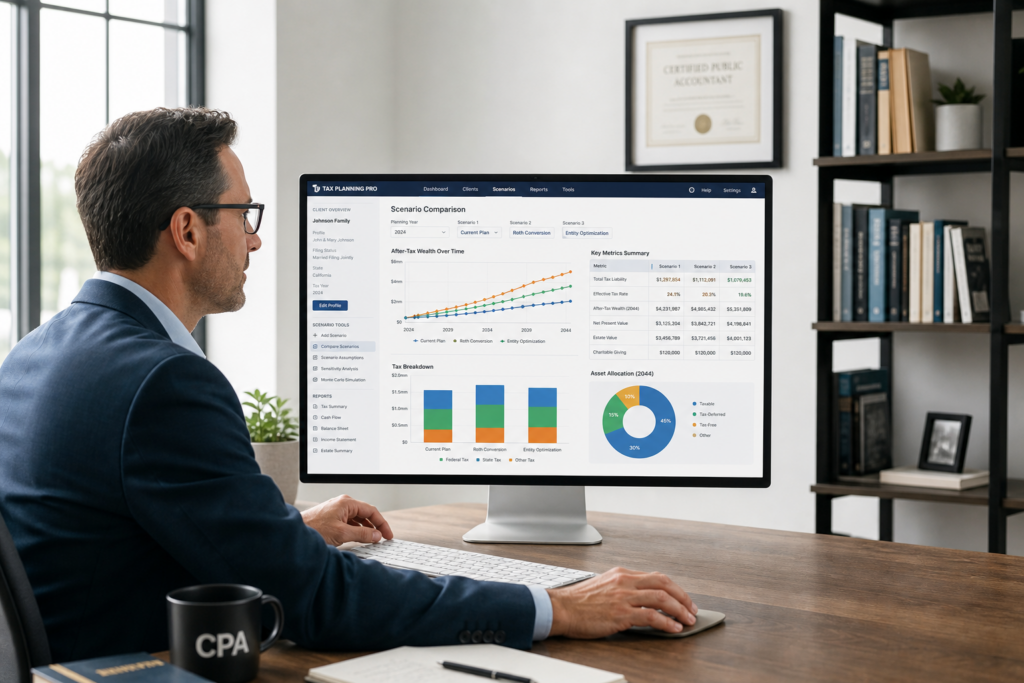
Scenario planning lets you test many “what if” outcomes. For example, you can compare a Roth conversion against a deferral. In addition, you can model a home office deduction or a retirement contribution. The tool then shows the tax impact of each choice. As a result, you present clear, data-backed advice.
Entity-Aware Analysis
Great software reviews the whole picture. It reads 1040s, 1120-S returns, and K-1 forms together. Consequently, it spots strategies across entities that siloed tools miss. Uncle Kam uses the MERNA framework here. This means Maximize deductions, Entity structure, Retirement, Niche strategies, and Advanced planning. This entity-aware tax planning software evaluates each client’s full portfolio at once, not one return in isolation.
AI Strategy Suggestions and Compliance Monitoring
AI now surfaces strategies you might overlook. For example, tools scan tax records and flag missed advisory opportunities. Similarly, they monitor compliance as laws change. This matters because the One Big Beautiful Bill Act made the 20% QBI deduction permanent. It also raised the SALT cap from $10,000 to $40,000. Good software updates for these shifts automatically. Learn more about proactive tax strategy planning to apply these changes.
Did You Know? The OBBBA made 100% bonus depreciation permanent in 2026. Software can now model full equipment expensing instantly for your clients.
How Does Planning Software Differ From Tax Prep Software?
Quick Answer: Prep software records the past and files returns. Planning software models the future and finds savings. You need both to run a modern, profitable firm.
Many CPAs confuse these two categories. However, they serve very different goals. Prep tools like CCH Axcess and Intuit products file compliant returns. In contrast, planning tools model strategies before the deadline. Both matter, but only planning drives advisory fees.
Backward-Looking vs. Forward-Looking
Prep software looks backward. It reports what already happened last year. Planning software looks forward. It asks how to reduce next year’s bill. Therefore, planning creates value that clients happily pay for. For a full comparison of prep and filing workflows, review our guide to tax prep and filing services.
Feature Comparison Table
The table below highlights the core differences. Use it to explain the value gap to your team.
| Feature | Tax Prep Software | Tax Planning Software |
|---|---|---|
| Primary Goal | File compliant returns | Reduce future tax |
| Time Focus | Past year | Future years |
| Scenario Modeling | Limited | Extensive |
| Revenue Type | Seasonal, low margin | Recurring, high margin |
| Client Deliverable | Filed return | Strategy roadmap |
Notice the revenue difference. Prep is seasonal and thin. Planning is recurring and rich. Consequently, adding a planning tool changes your entire business model.
How Do You Choose the Right Tool for Your Firm?

Quick Answer: Match the software to your client mix, growth goals, and tech stack. Then test the deliverables and pricing model before you commit.
The right tool depends on your firm. A solo CPA has different needs than a 50-person practice. Therefore, follow a clear evaluation process. The steps below keep you focused on value.
A Step-by-Step Evaluation Framework
- Define your clients: List their entity types and income levels.
- Set growth goals: Decide how much advisory revenue you want.
- Check integrations: Confirm it links to your prep and CRM tools.
- Test deliverables: Review the client-facing report quality.
- Compare pricing: Weigh flat fees against per-assessment costs.
Integration and Scalability Matter Most
Integration saves hours every week. For example, software that pulls IRS data or 1099 forms reduces data entry. In addition, links to payroll and bookkeeping tools keep numbers current. If you plan to grow, choose a platform that scales. Firms adding automation and financial systems avoid painful software switches later.
Compliance and Multi-State Needs
Many clients operate across state lines. Therefore, your tool must handle multi-state rules. It should also update quickly when laws change. For instance, the IRS newsroom posts guidance often. Software that syncs with these updates protects your clients. This is vital for high-net-worth individuals with complex, multi-entity returns. Selling advisory and delivering advisory are two different skills. You need a complete tax advisory operating system that supports both the strategy and the client relationship.
Pro Tip: Ask vendors for a sample client report. If it looks like a spreadsheet, keep looking. Clients pay for clarity.
How Much Does Tax Planning Software Cost and Is It Worth It?
Quick Answer: Costs range from a few hundred to several thousand dollars a year. The ROI comes fast when one advisory plan can bill $5,000 or more.
Pricing models vary widely. Some tools charge per analysis. Others charge a flat annual fee. A few, like Uncle Kam, include unlimited free assessments at every tier. This model removes the fear of “using up” credits on prospects.
The Cost of Capped Assessments
Many platforms cap usage or charge per plan. As a result, CPAs hesitate to run assessments on prospects. However, that hesitation costs sales. The biggest friction point in advisory is proving value before the fee. Unlimited assessments solve this. You can run a plan on every prospect and show savings first. That is why many pros choose tax planning software with unlimited assessments.
A Simple ROI Calculation
Let’s run the numbers. Suppose your software costs $3,000 a year. Now suppose you close five advisory clients at $5,000 each. That is $25,000 in new revenue. Therefore, your ROI is more than 8x in year one. Even one client covers the tool. Many firms report much higher returns after building a full advisory pipeline.
| Item | Amount |
|---|---|
| Annual software cost | $3,000 |
| Advisory clients closed | 5 |
| Fee per plan | $5,000 |
| New revenue | $25,000 |
| First-year ROI | 733% |
The math is clear. Planning software pays for itself quickly. Ready to see your own numbers? You can book a strategy session to map out your advisory revenue plan today.
Uncle Kam in Action: The Solo CPA Who Scaled Advisory
Client Snapshot: Maria is a solo CPA in a mid-size city. She had 120 tax prep clients but almost no advisory work.
Financial Profile: Her firm earned about $180,000 a year. Nearly all of it came from seasonal prep fees.
The Challenge: Maria felt stuck. Her income peaked every April, then dropped. Moreover, she used spreadsheets to model strategies. This slowed her down and raised her error risk. She wanted recurring revenue but lacked a system to sell it.
The Uncle Kam Solution: Maria adopted the Uncle Kam advisory operating system. First, she ran free assessments on 30 existing clients. The software used the MERNA framework to scan each portfolio. As a result, it flagged missed strategies across their 1040s and 1120-S returns. Next, she generated client-ready plans with clear roadmaps. These reports showed exact savings from moves like S corp elections and retirement funding. In addition, she used the built-in training to learn how to price and pitch advisory.
The Results: Maria closed 12 advisory clients in her first four months. Each paid an average fee of $4,800. Therefore, she added $57,600 in new recurring revenue. Her clients saved a combined $210,000 in projected taxes. Her software and training investment was $3,600. That produced a first-year ROI of roughly 16x. More importantly, her income no longer depends on tax season alone.
Maria’s story is common. You can read more outcomes on our client results page. The pattern repeats when the right tools meet a clear process.
Next Steps
Ready to grow your advisory practice? Take these clear actions this week. Each step moves you closer to recurring revenue. Explore our tax advisory services to see the full model.
- List your top 20 clients who need proactive planning.
- Run a free assessment to reveal their potential savings.
- Present one client-ready plan and quote a flat fee.
- Book a strategy session to build your advisory roadmap.
Related Resources
- Proactive Tax Strategy Services
- The MERNA Method Explained
- Entity Structuring Guidance
- Tax Strategy Blog
Frequently Asked Questions
Is tax planning software the same as tax prep software?
No, they serve different goals. Prep software files returns for the past year. Planning software models future strategies and finds savings. Most firms need both tools. However, planning drives your advisory revenue.
How much can a CPA charge for a tax plan in 2026?
Fees vary by complexity. Many CPAs charge $2,500 to $10,000 per plan. High-net-worth clients often pay more. The key is showing clear savings first. When clients see the value, they pay the fee.
Do I still need a PTIN to use planning software?
Yes, if you prepare returns for pay. The IRS requires a valid PTIN under Circular 230 rules. Planning software does not change that duty. Always keep your credentials current for 2026.
How does AI affect tax compliance in 2026?
The IRS now uses AI to flag anomalies. In February 2026, it codified AI in audit selection through IRM 10.24.1. Therefore, strong documentation matters more than ever. Good software helps you defend client positions with clear records.
How long does it take to see ROI from the software?
Most firms see ROI within months. One advisory client often covers the annual cost. After that, every plan adds profit. As a result, the payback is fast when you commit to selling advisory.
Can planning software handle multi-state and complex clients?
Yes, top tools handle multi-state rules. They also model complex, multi-entity portfolios. Look for entity-aware analysis that reads 1040s, 1120-S returns, and K-1s together. This depth protects your most complex clients.
This information is current as of 7/8/2026. Tax laws change frequently. Verify updates with the IRS if reading this later.
Last updated: July, 2026

