
OCR for Receipts: The 2026 Guide for Solo Tax Practitioners
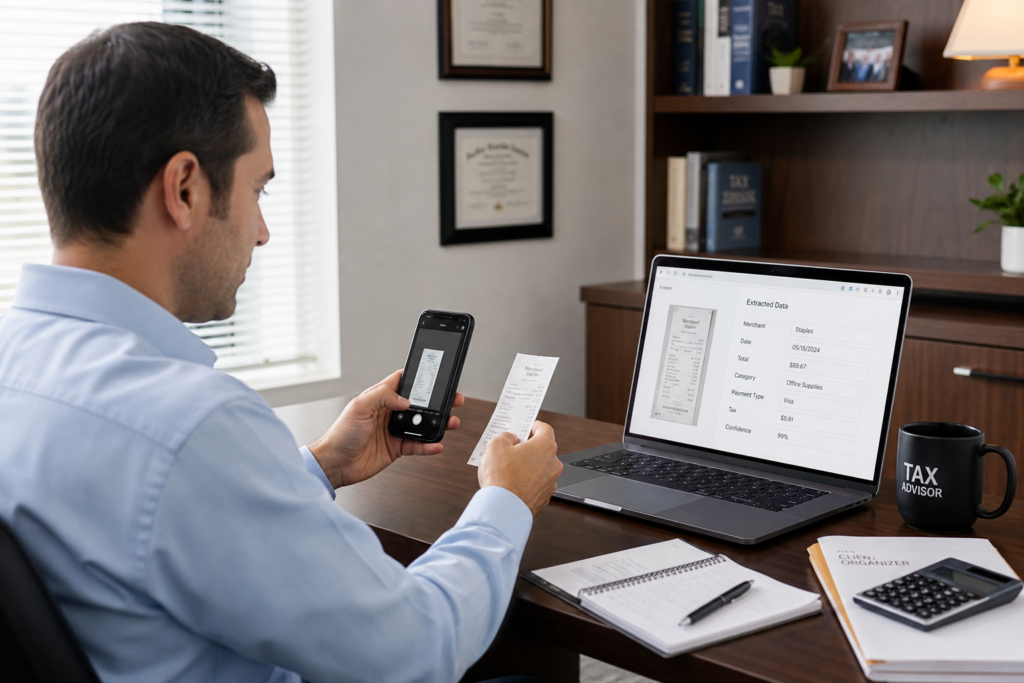
Every tax season, solo practitioners drown in paper. OCR for receipts changes that. OCR, short for Optical Character Recognition, reads a receipt image and pulls out the vendor, date, and amount automatically. For the 2026 tax year, modern OCR for receipts hits 95-99% accuracy on standard printed documents. As a result, you stop typing and start advising. This guide shows solo tax pros how to use this expense automation and workflow system to escape the compliance-only trap.
Table of Contents
- Key Takeaways
- What Is OCR for Receipts and How Does It Work?
- How Accurate Is OCR for Receipts in 2026?
- How Does OCR for Receipts Free You for Advisory Work?
- What Are the IRS Rules for Digital Receipts?
- How Do You Implement OCR for Receipts in Your Firm?
- What Are the Risks and Limits of Receipt OCR?
- Uncle Kam in Action
- Next Steps
- Related Resources
- Frequently Asked Questions

Key Takeaways
- OCR for receipts reaches 95-99% accuracy on standard printed documents in 2026.
- Manual entry can eat 2-3 hours daily; OCR cuts it to minutes.
- Freed hours fund a move into high-margin advisory services.
- The IRS accepts digital receipts kept legible and retrievable.
- Solo firms can reach 90%+ straight-through processing with good workflows.
What Is OCR for Receipts and How Does It Work?
Quick Answer: OCR for receipts converts a photo or scan into structured data. It reads the vendor, date, tax, and total automatically.
OCR stands for Optical Character Recognition. In plain terms, it turns a picture of a receipt into text a computer can use. Furthermore, modern tools add artificial intelligence on top of basic OCR. As a result, the software understands the content, not just the pixels. It knows which number is the total and which is the tax.
Old template-based OCR needed a fixed layout for every vendor. That approach broke often. However, today’s AI-powered systems learn new receipt formats on their own. Therefore, they handle crumpled gas receipts and clean invoices alike. This shift matters most for solo tax pros who see hundreds of unique vendor formats each season.
The Basic Workflow Step by Step
Here is how a typical receipt moves through an OCR system. In addition, most tools follow this same core path.
- Capture: A client snaps a photo or forwards an email receipt.
- Extract: AI pulls vendor, date, amount, and tax fields.
- Validate: The system checks for duplicates and missing data.
- Categorize: It assigns an expense category automatically.
- Sync: Clean data flows into your ledger or tax software.
Why Solo Practitioners Care Most
You wear every hat. Consequently, data entry steals time from client strategy. A solo firm cannot hire five staff to type receipts. Instead, OCR becomes your virtual data-entry team. Moreover, it works nights and weekends without overtime. This leverage is exactly what small firms need to compete and grow.
Pro Tip: Start with your highest-volume client. That is where OCR for receipts saves the most hours fast.
If you serve entrepreneurs and small companies, tie this system to your tax help for business owners. In short, automation frees you to deliver more value per client.
How Accurate Is OCR for Receipts in 2026?
Quick Answer: AI-powered OCR hits 95-99% accuracy on standard printed receipts in 2026. Faded or handwritten items need review.
Accuracy is the top question solo pros ask. The good news is strong. Modern OCR for receipts reaches 95-99% accuracy on clean, printed documents. Furthermore, the systems improve as they learn from your corrections. Therefore, accuracy climbs over your first few months of use.
Accuracy still depends on image quality. A blurry photo or a faded thermal receipt lowers results. However, good capture habits fix most problems. In addition, review workflows flag any low-confidence item for a human check. As a result, errors rarely reach the final return.
Accuracy by Receipt Type
Not every receipt reads the same. The table below shows typical 2026 ranges. Use it to set client expectations.
| Receipt Type | Typical 2026 Accuracy | Review Needed? |
|---|---|---|
| Printed invoice | 98-99% | Rarely |
| Standard store receipt | 95-98% | Sometimes |
| Faded thermal receipt | 85-93% | Often |
| Handwritten note | 70-85% | Always |
Straight-Through Processing Matters More Than Raw Accuracy
Raw accuracy is only half the story. What counts is straight-through processing. This means how many receipts finish without any human touch. In 2026, strong workflows reach 90% or higher. Some finance teams even report 96.6% straight-through processing. Consequently, you review only the exceptions.
Did You Know? Reaching 90% straight-through processing depends more on validation rules than on OCR alone.
You can verify software claims against neutral benchmarks. For deeper context, review guidance from the National Institute of Standards and Technology, which studies text-recognition performance. Independent standards help you cut through vendor hype.
How Does OCR for Receipts Free You for Advisory Work?
Quick Answer: OCR removes data entry, which can eat 2-3 hours daily. Those hours fund high-margin advisory services.
This is the real prize. Compliance work pays by the hour and caps your income. Advisory work pays for insight and scales far better. However, you cannot advise while buried in receipts. Therefore, OCR for receipts is the bridge from grind to growth.
Consider the math. A clerk processing 50 invoices a day can spend 2-3 hours on pure entry. Multiply that across a busy season. As a result, you lose hundreds of hours to typing. Those same hours could fund a recurring tax advisory relationship worth thousands per client.
The Advisory Shift the Profession Is Making
The whole industry is moving this way. Firms increasingly expand beyond tax and audit into advisory, technology, and consulting. Moreover, manager and partner pay now reflects advisory skill, not compliance speed. Partner-level pay tops $207,000 partly because advisory drives premium fees. Learn how the Uncle Kam marketplace helps tax pros transition to advisory with AI software, MERNA certification, and warm leads.
San Diego business owners weighing an S corp election can test the savings first. Offer clients our LLC vs S-Corp Tax Calculator for San Diego to estimate 2026 tax savings before you sell the plan. This lets you prove value fast.
Turning Freed Hours Into Revenue
Freeing time is step one. Filling that time with paid advisory is step two. The biggest friction for solo pros is proving value before a client signs. Many planning tools charge per analysis, so you ration them. In contrast, Uncle Kam offers tax planning software with unlimited assessments. Consequently, you can run a client-ready assessment on every prospect for free and upsell advisory with confidence.
Pro Tip: Book a strategy session at Uncle Kam advisory services to map your advisory transition.
What Are the IRS Rules for Digital Receipts?
Quick Answer: The IRS accepts digital receipts if they are legible, complete, and retrievable. Scanned images are fine.
Many solo pros worry that digital records break IRS rules. They do not. The IRS has long accepted electronic recordkeeping. In fact, the agency itself is scanning paper under its Zero Paper Initiative. Therefore, well-kept digital receipts are fully compliant for the 2026 tax year.
The core rule is simple. Records must be accurate, complete, and available on request. For example, IRS guidance in Publication 583 on recordkeeping supports electronic records. In addition, IRS small business recordkeeping guidance confirms clients may keep records digitally.
Retention Periods to Advise Clients On
Clients often ask how long to keep receipts. The table below sums up common IRS periods. Share it during onboarding.
| Situation | Keep Records For |
|---|---|
| General business returns | 3 years |
| Underreported income over 25% | 6 years |
| Employment tax records | 4 years |
| No return or fraud | Indefinitely |
Did You Know? The IRS awarded $2.3 billion in Zero Paper contracts running through 2030 to digitize its own files.
Keep Backups and Guard Data
Digital does not mean careless. Back up receipts in two places. Furthermore, use encryption for client data. The IRS itself faced security findings on its scanning program in 2026. Therefore, treat data security as a core duty, not an afterthought.
How Do You Implement OCR for Receipts in Your Firm?

Quick Answer: Map your workflow, pick a tool, run a pilot, then redeploy freed hours into advisory services.
Implementation feels scary, yet it is simple. You do not need a huge budget or an IT team. Instead, follow a clear five-step plan. As a result, you can go live before the next busy season.
The Five-Step Rollout Plan
- Map your current receipt workflow and time each step.
- Pick an AI OCR tool that learns new formats.
- Run a 30-day pilot with one active client.
- Set validation rules to catch duplicates and errors.
- Redeploy freed hours into advisory and planning.
Freelancers and contractors benefit here too. If you serve them, connect this to your tax strategies for self-employed clients. In addition, clean receipt data makes Schedule C prep far faster.
What to Look For in a Tool
Not all OCR tools work the same. Evaluate more than raw extraction. Specifically, weigh these features before you buy.
- Learning AI that adapts to new receipt layouts.
- Duplicate detection to stop double entries.
- Clean sync with your ledger or tax software.
- Easy review screen for flagged exceptions.
- Strong encryption and audit trails for compliance.
For broader planning tools your clients can use, explore Uncle Kam tax calculators and planning resources. These pair well with your new automation stack.
What Are the Risks and Limits of Receipt OCR?
Quick Answer: Main limits are poor image quality, edge-case formats, and data security. Human review closes these gaps.
No tool is perfect. Honesty builds client trust. OCR for receipts struggles with faded, torn, or handwritten items. However, a review step catches these before filing. Therefore, you keep full control of accuracy.
Security is the second risk. You handle sensitive client data. As a result, weak systems create real exposure. Choose vendors with encryption and clear audit logs. For a security baseline, review the CISA cybersecurity best practices before you commit.
Common Mistakes to Avoid
Most failures come from process, not software. Avoid these traps as you scale.
- Skipping validation rules and trusting every extraction.
- Failing to train clients on clean receipt capture.
- Storing receipts in only one location.
- Ignoring encryption for stored client data.
Pro Tip: Keep a human review step for any receipt above a set dollar amount.
When you fix these gaps, automation becomes a strategic asset. Ready to build a scalable advisory model? Explore how Uncle Kam supports San Diego tax advisor services and book a free strategy session to plan your transition.
Uncle Kam in Action: A Solo Practitioner Reclaims 400 Hours
Client Snapshot: Maria runs a solo tax firm in San Diego. She is 44 and handles 120 small-business clients alone.
Financial Profile: Her firm booked about $185,000 in revenue in 2026. Nearly all of it came from compliance work.
The Challenge: Maria spent up to three hours a day typing receipts each busy season. Consequently, she had no time to sell advisory. Her income stayed flat, and burnout loomed. Moreover, she turned away growth because she had no free hours.
The Uncle Kam Solution: Maria adopted an AI OCR for receipts workflow. In addition, she used Uncle Kam to run free, client-ready tax assessments on every prospect. The system flagged S corp elections and retirement strategies across her book. As a result, she moved 20 clients into paid advisory plans.
The Results: OCR cut her data entry from three hours to 25 minutes daily. Therefore, she reclaimed roughly 400 hours across the year. She sold 20 advisory engagements at an average of $3,000 each. That added $60,000 in new advisory revenue in year one.
Tax Savings Delivered: Across those clients, Maria found over $140,000 in combined 2026 tax savings. Investment: Her Uncle Kam and OCR tooling cost about $6,000 for the year. ROI: On new revenue alone, that is a 10x first-year return. In short, automation funded her advisory launch. See more outcomes at real Uncle Kam client results.
Next Steps
You now have the roadmap. Take these steps to put it to work in 2026.
- Time your current receipt workflow this week.
- Pilot an AI OCR tool with one busy client.
- Map freed hours to a new proactive tax strategy offer.
- Apply to join the network and book a free strategy session to scale advisory.
Related Resources
- Bookkeeping and automation solutions
- The MERNA Method framework
- Uncle Kam tax strategy blog
- Tax prep and filing services
Frequently Asked Questions
Is OCR for receipts accurate enough for tax work?
Yes, for most receipts. AI OCR reaches 95-99% accuracy on printed items in 2026. However, always keep a human review step. That way, faded or handwritten receipts get checked before filing.
Does the IRS accept digital receipts?
Yes. The IRS accepts electronic records that are legible and retrievable. Publication 583 supports digital recordkeeping. Therefore, scanned receipts are fully valid when stored properly and backed up.
How much time can OCR for receipts really save?
A lot. Manual entry can take 2-3 hours daily for 50 receipts. OCR cuts that to minutes. As a result, solo firms often reclaim hundreds of hours each year for advisory work.
How long does implementation take?
Most solo firms go live in about 30 days. First, map your workflow. Then run a short pilot. Finally, set validation rules and redeploy your freed hours into paid advisory.
Is receipt OCR worth the cost for a small firm?
Usually, yes. The tooling cost is small next to the hours saved. Moreover, those hours fund advisory fees. One solo pro turned a $6,000 investment into $60,000 in new advisory revenue.
This information is current as of 7/27/2026. Tax laws change frequently. Verify updates with the IRS or FTB if reading this later.
Last updated: July, 2026

