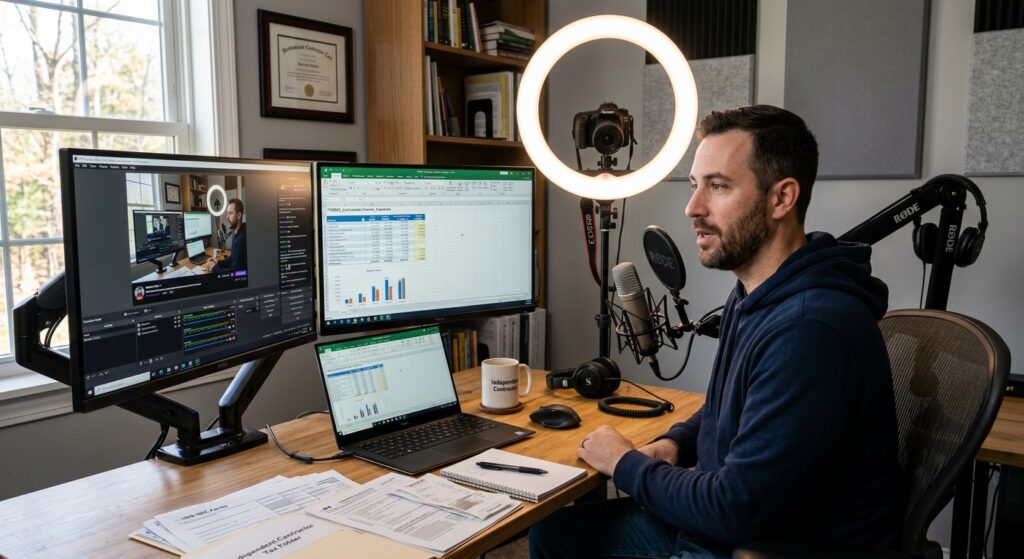
Independent Contractor Streaming Setup: 2026 Tax Guide
Building an independent contractor streaming setup is exciting. However, many creators forget the tax side. As a result, they overpay every year. This 2026 guide shows you how to deduct your gear, cut self-employment tax, and choose the right business structure. Moreover, we cover home office rules, quarterly taxes, and smart entity planning. Ready to keep more of your streaming income? Let’s dive in and get you organized for tax season.
Table of Contents
- Key Takeaways
- What Is an Independent Contractor Streaming Setup for Tax Purposes?
- What Streaming Equipment Can You Deduct in 2026?
- How Does Self-Employment Tax Work for Streamers?
- Can You Claim a Home Office for Your Stream?
- Should You Form an LLC or S Corp for Your Streaming Business?
- How Do You Handle Quarterly Taxes as a Streamer?
- Uncle Kam in Action
- Related Resources
- Next Steps
- Frequently Asked Questions
Key Takeaways
- Your streaming setup counts as business equipment. Therefore, most of it is deductible.
- Streamers pay 15.3% self-employment tax on net profit in 2026.
- A home office deduction can lower your taxable streaming income.
- An S Corp election may cut self-employment tax at higher income levels.
- Pay quarterly estimated taxes to avoid IRS penalties.
What Is an Independent Contractor Streaming Setup for Tax Purposes?
Quick Answer: An independent contractor streaming setup is the gear and space you use to earn streaming income. For tax purposes, it becomes a deductible business asset.
When you stream for money, the IRS sees you as self-employed. Therefore, your streaming activity is a business, not a hobby. Your independent contractor streaming setup includes cameras, mics, lights, and your PC. In addition, it covers software, internet, and your recording space. Each piece can reduce your tax bill when used for work. Many creators also qualify for planning help through tax help for self-employed creators.
The IRS treats streaming income like any other self-employment income. You report it on Schedule C. Consequently, you subtract your business expenses from your revenue. What remains is your net profit. That profit faces both income tax and self-employment tax. However, smart planning shrinks that profit legally.
Hobby Versus Business: Why It Matters
The IRS separates hobbies from businesses. A hobby cannot deduct expenses. A business can. Therefore, treating your channel like a real business is key. The IRS hobby versus business rules look at your intent to profit.
Show that you want to make money. Keep records, track expenses, and market your channel. As a result, the IRS is more likely to view you as a business. This unlocks every deduction tied to your streaming setup.
What Streaming Income Counts
- Subscription and channel membership revenue
- Ad and platform payouts, like YouTube or Twitch
- Donations, tips, and bits from viewers
- Sponsorships and brand deals
- Merchandise and affiliate sales
Pro Tip: Platforms send Form 1099-NEC or 1099-K when you cross reporting thresholds. However, report all income even without a form.
What Streaming Equipment Can You Deduct in 2026?
Quick Answer: You can deduct nearly all gear used for streaming. This includes cameras, mics, lights, computers, and software.
Your independent contractor streaming setup is full of deductible items. Every tool you buy for the business counts. Furthermore, you can often deduct the full cost in the first year. This is because of Section 179 and bonus depreciation. Both let you write off equipment fast. Learn more about smart write-offs through proactive tax strategy planning.
The IRS allows deductions for ordinary and necessary business costs. Streaming gear clearly fits. However, mixed-use items need a business-use percentage. For example, a laptop used half for gaming and half for streaming is 50% deductible. Track your usage honestly.
Common Deductible Streaming Gear
- Webcams, DSLRs, and capture cards
- Microphones, mixers, and audio interfaces
- Ring lights, softboxes, and green screens
- Streaming PC, monitors, and graphics cards
- Editing and streaming software subscriptions
- A share of your monthly internet bill
Section 179 and Depreciation Basics
Section 179 lets you deduct equipment in the year you buy it. Therefore, a $5,000 camera setup can lower this year’s profit fully. The IRS Publication 946 on depreciation explains the rules. Verify current limits at IRS.gov before filing.
Bonus depreciation offers another fast write-off path. However, the percentage changes over time. As a result, check the 2026 rate before you plan a large purchase. A tax pro can confirm which method saves you more.
Sample Equipment Deduction Table
| Item | Cost | Business Use | Deductible |
|---|---|---|---|
| Streaming PC | $2,500 | 80% | $2,000 |
| Camera and lights | $1,200 | 100% | $1,200 |
| Microphone | $300 | 100% | $300 |
| Internet (annual share) | $960 | 40% | $384 |
Did You Know? You can deduct game purchases if you stream them for content. Keep proof that the game supports your channel.
How Does Self-Employment Tax Work for Streamers?
Quick Answer: Self-employed streamers pay 15.3% self-employment tax on net profit. This covers Social Security and Medicare.
Self-employment tax surprises many new creators. As an employee, your boss pays half of these taxes. However, as a self-employed streamer, you pay both halves. The 2026 rate is 15.3% on net earnings. This sits on top of your regular income tax. The IRS self-employment tax page confirms the rate.
The 15.3% splits into two parts. First, 12.4% funds Social Security. Second, 2.9% funds Medicare. The Social Security portion applies up to an annual wage cap. Verify the 2026 cap at IRS.gov, since it rises each year. Above that cap, only the Medicare portion continues.
How to Lower Your Self-Employment Tax
The best way to cut this tax is to lower net profit. Therefore, claim every legit deduction. Your streaming setup, home office, and software all help. In addition, you can deduct half of your self-employment tax on your return.
High earners may benefit from an S Corp election. This strategy can reduce the profit exposed to self-employment tax. We cover that option below. Meanwhile, explore ongoing help through personalized tax advisory support.
Self-Employment Tax Example
Imagine you earn $60,000 streaming. After deductions, your net profit is $45,000. Your self-employment tax base is about 92.35% of that. So you pay 15.3% on roughly $41,558. That equals about $6,358 in self-employment tax. Deductions clearly matter a lot.
Pro Tip: Contribute to a SEP-IRA or Solo 401(k). This lowers taxable income and builds retirement savings at once.
Can You Claim a Home Office for Your Stream?
Quick Answer: Yes. If you stream from a dedicated space, you can claim a home office deduction in 2026.
Most streamers work from home. Therefore, the home office deduction is a powerful tool. To qualify, you need a space used regularly and only for business. Your streaming room often meets this test. The IRS home office deduction guide explains the rules clearly.
You can pick one of two methods. The simplified method uses a set rate per square foot. The regular method uses actual costs, like rent and utilities. Both reduce your taxable streaming income. However, one usually saves more than the other.
Simplified Versus Regular Method
| Feature | Simplified Method | Regular Method |
|---|---|---|
| Calculation | Flat rate per square foot | Actual home expenses |
| Recordkeeping | Minimal | Detailed receipts |
| Best for | Small spaces | Large or costly spaces |
Home Office Tips for Streamers
Keep your streaming space clearly business-only. Furthermore, take photos to document the setup. Measure the square footage carefully. As a result, your deduction will hold up if the IRS ever asks. Serious creators should explore smart business structure options too.
Pro Tip: A dedicated streaming room beats a shared bedroom. Exclusive use is the key rule to remember.
Should You Form an LLC or S Corp for Your Streaming Business?
 Free Tax Write-Off Finder
Quick Answer: An LLC protects your assets. An S Corp election can cut self-employment tax once profits grow.
Your business structure affects both taxes and liability. Many streamers start as sole proprietors. However, growth often calls for an LLC. An LLC separates your personal and business assets. Therefore, it shields your savings from business risk. Learn more on our resources for business owners.
Once your streaming profit grows, an S Corp election may help. With an S Corp, you pay yourself a reasonable salary. The rest comes out as distributions. Distributions avoid self-employment tax. As a result, you can save thousands each year. Scottsdale creators can compare options with our LLC vs S-Corp Tax Calculator for Scottsdale to estimate 2026 savings.
The Reasonable Salary Rule
The IRS requires S Corp owners to pay a fair wage. Therefore, you cannot take everything as distributions. Your salary must match what similar work pays. The IRS S Corporation guidance covers these rules. Get this balance right to stay compliant.
When Does an S Corp Make Sense?
- Your net streaming profit tops roughly $50,000 to $60,000
- Your income is stable and predictable
- You can handle payroll and extra filings
- You want to lower self-employment tax legally
Did You Know? An S Corp requires payroll setup and a Form 1120-S filing. Plan for the extra admin work.
How Do You Handle Quarterly Taxes as a Streamer?
Quick Answer: Self-employed streamers pay estimated taxes four times a year. This avoids IRS underpayment penalties.
Streaming income has no automatic withholding. Therefore, you must pay taxes yourself throughout the year. The IRS wants quarterly estimated payments. If you skip them, penalties can add up. The IRS estimated taxes page lists the due dates.
Generally, you owe estimated taxes if you expect to owe $1,000 or more. As a result, most active streamers must pay. Set aside a portion of each payout. Many creators save 25% to 30% for taxes. This habit prevents nasty surprises. Consistent filing support comes through reliable tax prep and filing.
The 2026 Quarterly Payment Schedule
Estimated taxes are due four times each year. The rough schedule falls in April, June, September, and January. However, exact dates shift for weekends and holidays. Confirm the 2026 dates at IRS.gov before you pay. Mark them on your calendar early.
Track Income and Expenses Year-Round
Good records make quarterly taxes simple. Therefore, use accounting software or a spreadsheet. Log every payout and every expense. In addition, keep digital receipts for gear. Clean books also protect you during an audit.
Pro Tip: Open a separate business bank account. This keeps streaming income clean and easy to track.

Uncle Kam in Action: How a Full-Time Streamer Saved $11,400
Client Snapshot: Meet Jordan, a full-time gaming streamer and content creator. Jordan built a serious independent contractor streaming setup at home. However, taxes overwhelmed him.
Financial Profile: Jordan earned $92,000 in streaming revenue for 2026. His income came from ads, subs, tips, and two sponsorships. Yet he had almost no tax plan.
The Challenge: Jordan reported everything on a simple Schedule C. As a result, he paid full self-employment tax on his entire profit. He also missed key deductions. His gear, home office, and software went unclaimed. Consequently, his tax bill was far too high.
The Uncle Kam Solution: Our team reviewed his entire operation. First, we captured every equipment deduction from his setup. Next, we claimed his dedicated streaming room as a home office. Then we filed an S Corp election for his growing profit. We set a reasonable salary and took the rest as distributions. Finally, we built a quarterly tax plan to avoid penalties.
The Results: Jordan saved $11,400 in his first year with us. The S Corp move cut his self-employment tax sharply. His equipment and home office deductions did the rest. He paid Uncle Kam $4,200 for full-service planning and filing. Therefore, his first-year return on investment topped 2.7 times the fee. See more wins on our client results and case studies page. Jordan now keeps more of every stream.
Related Resources
- Tax Strategies for Self-Employed Creators
- Free Tax Calculators for Freelancers
- Uncle Kam Tax Strategy Blog
- The MERNA Tax Planning Method
Next Steps
Ready to keep more of your streaming income? Take these steps to protect your profits in 2026. A strong plan starts with the right bookkeeping and business systems in place.
- List every piece of your streaming setup for deductions.
- Open a separate business bank account today.
- Set aside 25% to 30% of each payout for taxes.
- Book a call to explore an S Corp election.
- Schedule quarterly estimated tax payments now.
Frequently Asked Questions
Do I owe taxes if streaming is just a side hustle?
Yes. All streaming income is taxable, even part-time earnings. You report it on Schedule C. However, your deductions still apply. Therefore, track expenses carefully to lower your bill.
Can I deduct my whole gaming PC as a streamer?
Only the business-use share is deductible. If you also game for fun, split the cost. For example, 70% business use means a 70% deduction. Keep honest records of your usage.
How much should I save for taxes as a streamer?
Most creators save 25% to 30% of each payout. This covers income and self-employment tax. However, high earners may need more. A tax pro can set your exact rate.
When should I switch from an LLC to an S Corp?
Consider it when net profit tops $50,000 to $60,000. At that point, the tax savings often beat the extra costs. However, your income should be stable. A quick calculation confirms the fit.
What happens if I skip quarterly estimated taxes?
The IRS may charge an underpayment penalty. Furthermore, you could owe a large lump sum in April. Therefore, pay quarterly to stay safe. Set reminders for each due date.
Can I deduct internet and utilities for streaming?
Yes, but only the business-use portion. Streaming uses a lot of internet. Therefore, a fair share is deductible. Utilities also count under the home office rules.
This information is current as of 9/5/2026. Tax laws change frequently. Verify current limits and dates at IRS.gov if reading this later.
Last updated: September, 2026

